
Fourteen tender notices landed in your inbox this morning. Two look plausible. One is a duplicate of something you dismissed last week, and one closed yesterday because nobody checked the clarification deadline.
Most bid teams don't have a discovery problem any more. Notices are structured, published centrally and searchable. The problem is screening: deciding which notices deserve 20 to 40 hours of writing, and being able to repeat that decision next month without re-arguing it from scratch.
I treat open tender tracking as a chain of screening decisions. Every link either earns the next one or kills the opportunity early. Get the first link wrong and everything downstream is wasted effort.
Where Open Tenders Are Published in the UK
A team that watches a single portal is watching a fraction of the market. Each UK portal has its own coverage rules, its own thresholds and its own publishing habits, and the gaps between them are where most missed opportunities sit.
Find a Tender became the main publication service for new UK procurements under the Procurement Act 2023 on 24 February 2025, carrying above-threshold notices across the full contract lifecycle from pipeline through to termination, plus below-threshold notices outside Scotland, per the Find a Tender service. For older procurements it generally covers above-threshold opportunities, usually those over £139,688 including VAT.
The thresholds that send a notice to one portal rather than another come from the Act itself. The Procurement Act 2023 schedules list £135,018 for supplies and services awarded by a central government authority and £5,193,000 for works, while below-threshold procedural requirements apply from £12,000 for central government bodies and £30,000 for sub-central authorities.
| Portal | What it covers | Value band | Best for |
|---|---|---|---|
| Find a Tender | Above-threshold notices across the full lifecycle, and most new below-threshold notices outside Scotland | £135,018 for central government supplies and services; £5,193,000 for works | Large and high-value contracts |
| Contracts Finder | Lower-value notices from central government and other public bodies | Over £12,000 central government; over £30,000 other bodies | Smaller contracts and first wins |
| Public Contracts Scotland | Scottish public sector, including below-threshold notices in Scotland | Over £12,000 central government; over £30,000 other bodies | Scottish buyers |
| Sell2Wales | Welsh public sector | Over £12,000 central government; over £30,000 other bodies | Welsh buyers |
| eTendersNI | Northern Ireland public sector | Above and below threshold, as the buyer publishes | Northern Ireland buyers |
The baseline test for which portals deserve a daily check
Log into each portal once, run a single search for your core service, and write down the number of live results. That number is your baseline. A portal returning a few hundred matches earns a daily check; one returning four earns a weekly sweep and nothing more. Do this before you build any automation, because it tells you where your attention pays.
It also gives you a benchmark for buyer behaviour. If you're checking a single council's notices by hand, a walkthrough such as our Buckinghamshire Council e-tendering guide shows how one authority structures its own listings before you commit to a routine.
The volume justifies the effort. In 2024–25, 52% of UK public procurement by value was tendered openly, excluding cross-government frameworks, according to Open Contracting Partnership figures cited in this Cabinet Office paper. Analysis of procurements covered by the Act, published in the Home Office SME action plan, found that 61% of contracts awarded through open tenders went to at least one SME, rising to 73% for below-threshold competitions, against 36% of direct awards. Open competition is where the access is.
Duplicates, Frameworks and Re-Tender Signals to Watch
Monday's feed shows the same requirement twice: one notice on Contracts Finder, the same buyer and reference on Find a Tender. Screen both and you spend the hour a live bid needed. Drop the duplicate before you read the specification.
A large notice count is a weak reason to stay on a portal. Independent 2025 market analysis identified 51,608 distinct UK public procurements worth approximately £185.3 billion across Contracts Finder, Find a Tender, Public Contracts Scotland and Sell2Wales, reported by Awarded Tenders. Find a Tender accounted for 8,639 procurements and about £64.0 billion of advertised value. Contracts Finder accounted for 41,219 procurements and £117.4 billion. Typical Find a Tender contracts were substantially larger, and that analysis puts Find a Tender's share of UK award value at 78%, up from 33% a year earlier.
| Portal | Procurements | Advertised value |
|---|---|---|
| Find a Tender | 8,639 | £64.0 billion |
| Contracts Finder | 41,219 | £117.4 billion |
| All four portals combined | 51,608 | £185.3 billion |
Public Contracts Scotland and Sell2Wales are not broken out separately in that analysis, so they sit inside the combined total.
Rank alerts by value per notice, not notices per day. A portal with 41,219 notices can be less useful than one with 8,639.
Four signals worth acting on
Treat these as a chain. Fail one and you stop, rather than opening a bid file.
- Duplicates. The same requirement often lands on two portals under one buyer and one reference. Match the reference before you score fit. Scoring the same notice twice is the quietest waste in a bid week.
- Frameworks. A framework notice is a route to call-offs, not a contract you can invoice. Read three things only: whether you can join, who can call off, and when it expires. If you cannot join, or the call-off buyers sit outside your patch, decline it the same day.
- Awards. An award notice is a diary entry. It names the winner, the value and the end date. A contract ending in 18 months goes in the calendar with a reminder six months before expiry, then you leave it alone until that date.
- Buyer history. A body that re-tenders the same service every year earns a standing alert on its name, not on a CPV code. A few large buyers, the Department of Health and Social Care among them, justify that alert and a named contact. Watch the buyer, not only the category.
Keep frameworks on their own pipeline line, off the general alert feed. A place on the framework can be worth less than the call-off that follows it, and the bid effort is different. Framework and call-off guidance sets out how those routes differ and when the call-off is the notice worth your week.
How to Set Up Alerts That Catch the Right Notices
A small supplier can spend more time sorting tender alerts than reading the notices that matter. Set filters to catch plausible work, then narrow them using the results. The aim is a manageable queue, not a perfect search.
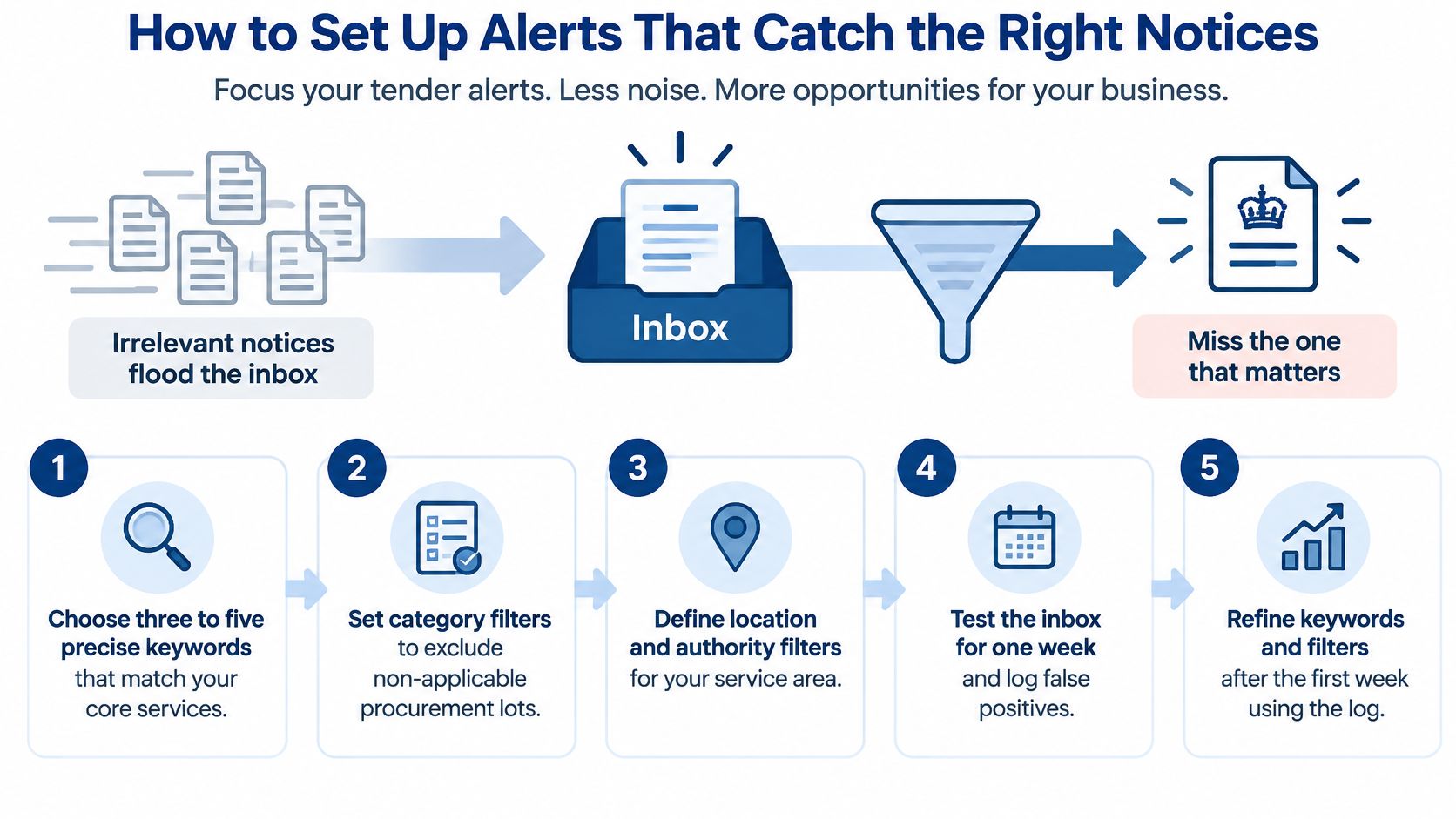
Start with the work your business can deliver now:
- Choose relevant CPV codes. Select codes that describe your actual services, not areas you might enter later. A short list is easier to refine than one padded with loosely related categories.
- Add buyer-language keywords. Pair CPV codes with phrases used in notices, such as “managed print” and “print services”. Include common synonyms, but avoid wording so broad that it brings in unrelated work.
- Set a region you can serve. Include locations your team can cover within your operating model and costs. Broader coverage may catch more notices, but it can also fill the queue with work you cannot deliver.
- Choose a value floor. Set a minimum contract value that makes the likely bidding effort worthwhile. A low-value opportunity can still take substantial time to answer.
- Select notice types. Include open tenders and planned procurements if you want to find upcoming work. Framework and award notices can help you track routes to market and buyer activity, but they are not invitations to bid on an open contract.
- Set a useful delivery frequency. Daily alerts suit opportunities that need prompt attention. A digest can work for broader searches, provided someone has time set aside to review it.
- Refine after the first week. Record which filters generate irrelevant results and adjust them. Keep a term or code if it catches a plausible opportunity, even when some of its other results are noise.
For a cleaning firm, a starting filter might combine cleaning-service CPV codes with “office cleaning” and “janitorial”, then limit results to the counties it serves and contracts above its chosen floor. The first results show whether the terms are too broad or narrow. Adjust the filters rather than adding every new phrase that appears in a notice.
Alerts need a clear place in the working routine. An inbox crowded with newsletters can bury a time-sensitive notice, so teams may want to review choosing an email management service alongside their alert setup.
Checking every UK portal manually is difficult to sustain. Bidwell watches every UK tender portal and sends daily alerts matching a business's sectors, frameworks and CPV codes, helping turn discovery into a shortlist for review.
How to Decide Which Open Tenders Are Worth Bidding On
A notice arrives on Monday with a buyer you recognise and a deadline three weeks out. By lunch someone has opened a blank response. Stop there. Screen the fit before anyone writes a word. A bid that dies on a missing certification spends the week you needed for fee-earning work, and you still have nothing to submit.
FSB research in Greater Manchester shows SMEs find public-sector bidding time-consuming, which is why the decision belongs before drafting, not after a draft exists, as the FSB's procurement report describes.
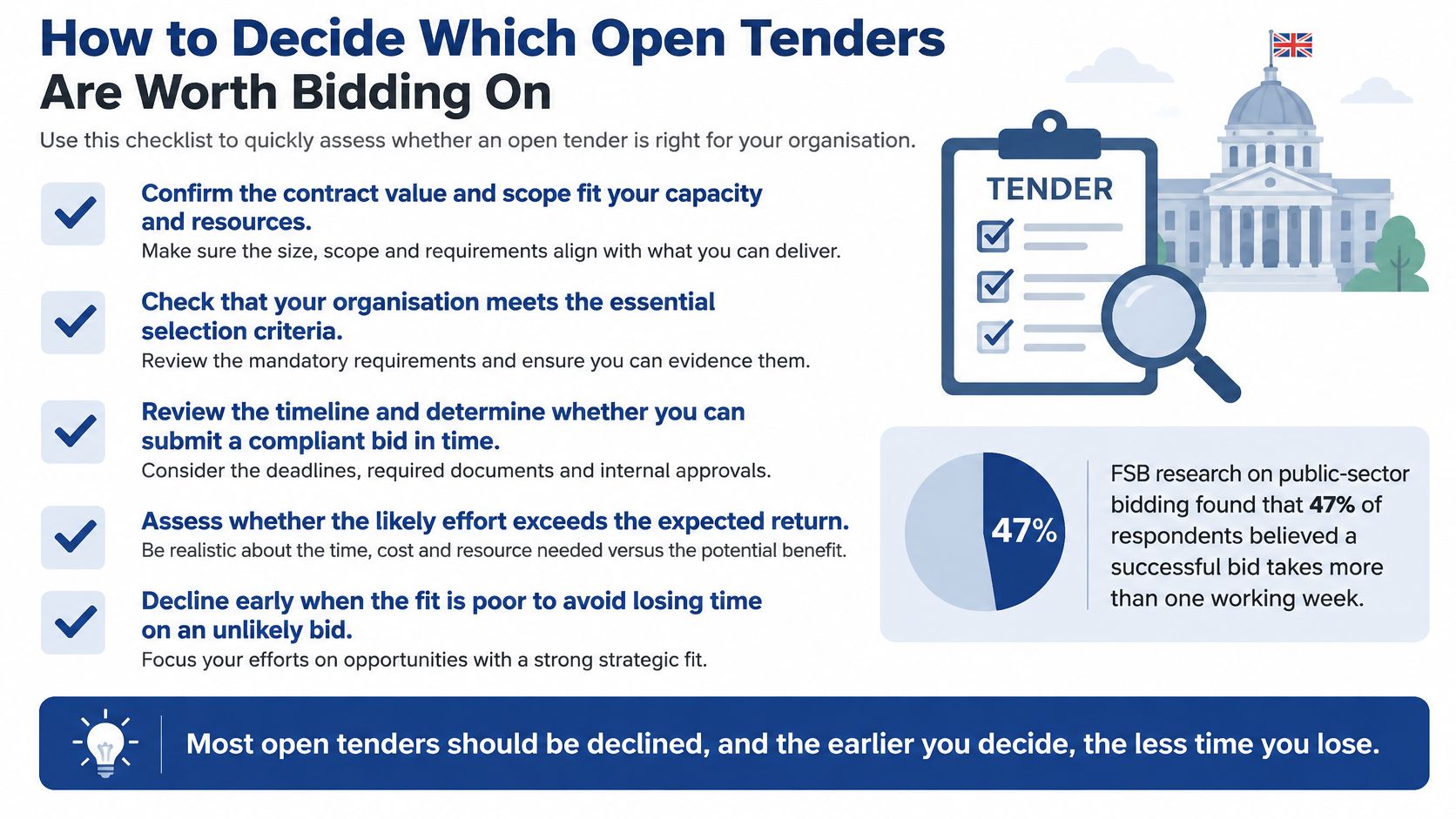
The economics work against casual bidding. Tender requirements create fixed participation costs that put smaller firms off more than large ones, and pre-qualification based on previous delivery can favour incumbents, as the Cabinet Office review of procurement in the national interest sets out. The same review points to poorly structured contracts, disproportionate financial thresholds, unrealistic timescales and risk that lands on the smaller party. Each of those is a reason to decline early, not a problem to solve inside the response.
What the gate checks
Give the notice about twenty minutes. Score it against thresholds you agreed in advance, when no live opportunity was pulling you in. Strategic fit and conflicts of interest come first. If the contract is outside the work you want, or a conflict blocks you, stop. Then work the table. One fail on a walk-away column is enough.
| Criterion | Proceed if | Walk away if |
|---|---|---|
| Deadline | You can draft and review in the time left | The timetable is too short for the scope |
| Mandatory certifications | You hold each one or can obtain it before the deadline | A required certification is missing and can't be gained in time |
| Capacity | Named people can deliver without dropping live work | The team is already at full capacity |
| Delivery geography | You can deliver to every required location | Delivery sits outside your reach or cost base |
| Specification | Requirements are clear and measurable | The specification is vague and clarification is refused |
| Budget | The budget fits the scope and your margin | The budget looks unrealistic for the work |
| Evaluation rules | Weightings and criteria are published | Evaluation rules are unclear |
| Contract risk | Insurance, payment terms and liability are workable | Risk sits disproportionately with you |
Most open tenders should be declined. The earlier you decide, the less time you lose, and a logged no-bid is a result, not a failure.
The certification row is the one that eats a morning when paperwork is scattered. Keep certificates, insurance schedules, accreditations and past answers in one knowledge base you can search, and that row takes minutes. Bidwell's knowledge base holds that material, so the eligibility questions are answered from your own documents rather than a hunt through shared drives. You still review the result and decide whether to bid.
Record every no-bid
Write why you declined, in one line: missing certification, budget below cost, delivery outside region, deadline impossible, conflict, or work you do not want. Six months later the same buyer often publishes something similar. The log turns that into a twenty-minute decision instead of the same argument again.
A vague specification, an unrealistic budget, a short timetable or unclear evaluation rules are warning signs on their own. If a clarification question cannot resolve them before the deadline, decline and log the reason. The notices you refuse are what keep the ones you do write inside the time you have.
Reading the Notice and Mapping the Scoring Criteria
Read the award criteria before you read the specification. Under the Procurement Act 2023, the authority must publish the criteria and the assessment methodology, or a summary, in the tender notice, as the guidance on assessing competitive tenders sets out. The criteria must relate to the contract subject matter and be clear, measurable, specific, proportionate and non-discriminatory.
When the specification and the criteria pull in different directions, the criteria win. They tell you what gets scored; the specification tells you what gets bought.
One structural point that changes how you read the notice: an open procedure is single-stage, with no restriction on who can submit a tender, per the Procurement Act 2023. There's no shortlist at the initial stage. The authority still checks whether suppliers, connected persons, associated persons and subcontractors are excluded or excludable before it assesses tenders. Anyone eligible can bid; not everyone gets scored.
Six steps from notice to draft
- Extract every scored criterion and pass/fail requirement into one list. Separate the two, because a pass/fail gate fails the whole bid while a weighted question just loses points.
- Build a compliance matrix. Link each requirement to an answer location and an evidence source. If a row has no evidence source, that's the gap to fill first.
- Reverse-engineer the scoring model from the published weightings. A 60% quality, 40% price split tells you where the drafting hours go.
- Allocate effort by weight. If quality carries 60%, it gets the majority of the writing time, and the price schedule gets checked, not rewritten five times.
- Evidence each claim with a measurable outcome, a named responsibility, a control and a relevant case study. Vague assertions about quality don't score.
- Run an evaluator-style review against the exact criteria, with someone who didn't write the answers.
The recurring technical error is a persuasive narrative that never maps to the scoring methodology. Government guidance requires evaluators to apply the stated criteria consistently, so unsupported benefits and content outside the published requirements can't compensate for missing evidence against a weighted question.
A persuasive answer that doesn't sit against a weighted criterion scores nothing. Evaluators can't award points for something the methodology doesn't ask for.
Evidence is where bids fail, and it's the same test whether you're writing a response or buying a tool that claims to help. The standard for verifiable evidence from AI providers applies equally to a supplier claim in your own bid: name the outcome, the owner, the measure and the date.
This is the stage where software earns its place. Our bid writing software drafts each new bid against the actual tender notice rather than a generic template, pulling from your knowledge base and citing the source for every answer, and you still check each answer against its criterion before it goes anywhere near the portal.
Tracking Tenders and Running the Weekly Review
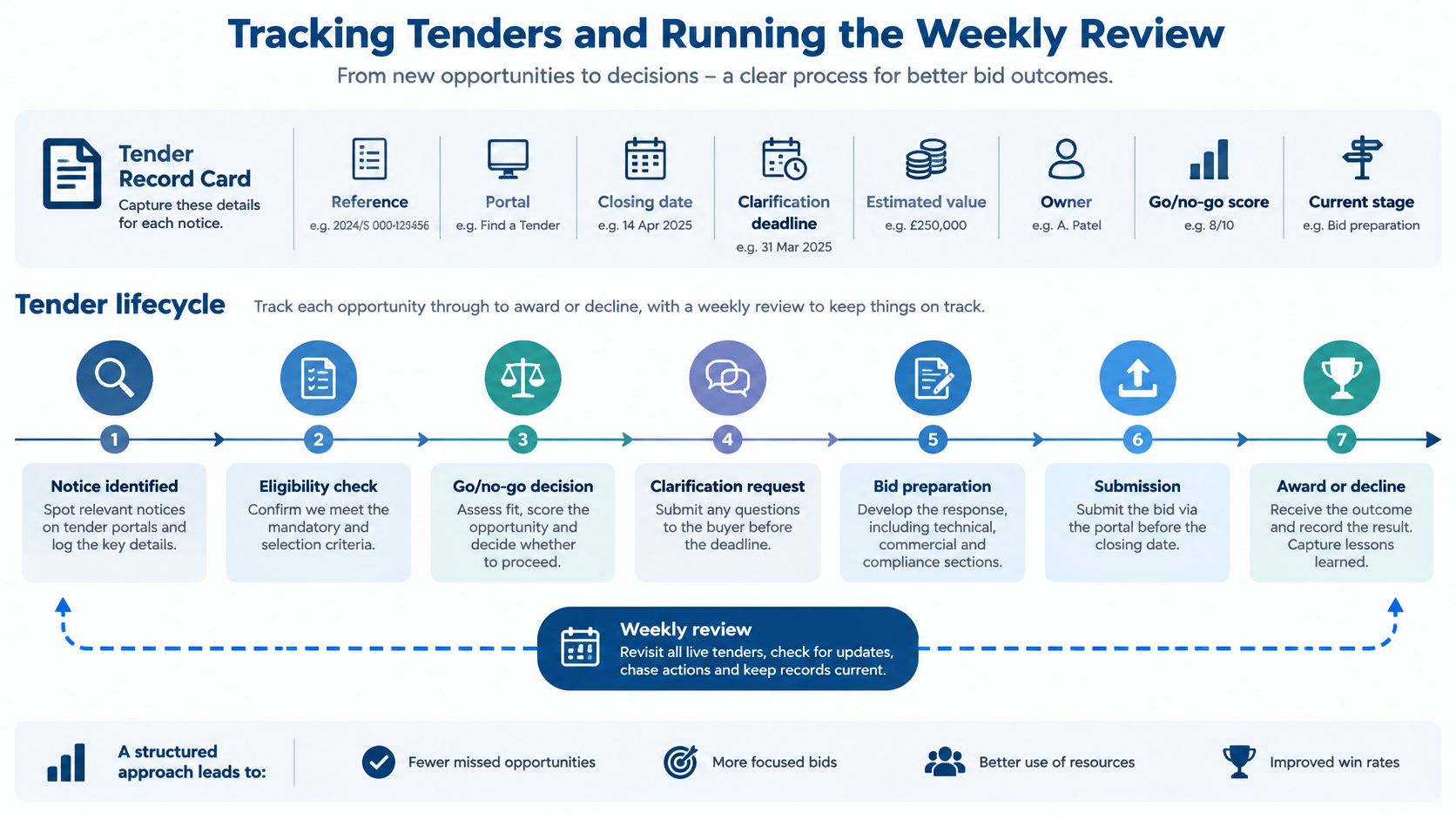
Discovery without a record is a hobby. One record per notice, carrying the reference, the portal, the closing date, the clarification deadline, the estimated value, the owner, the go/no-go score and the current stage. Use ten fields, one line each, in a sheet or a pipeline view.
Then move each tender through the same sequence: spotted, screened, bidding, submitted, awaiting decision, awarded or lost. No side states, no "pending a chat with the MD". The sequence is what makes the review fast, because you're looking at positions on a track rather than reconstructing a story.
Set the clarification deadline as a hard reminder
Late questions get refused, and the answer to an early one can change the bid entirely, from the pricing model to whether you bid at all. Put the deadline in the calendar the day you log the notice, a few working days before the buyer's cut-off so you've got time to draft a precise question. A vague question gets a vague answer, which is worse than no answer because it feels like progress.
The Monday review
Half an hour, same slot every week. Sort each new notice into bid, no-bid or watch. Log the reason for each decision, including the no-bids. Check what closes in the next ten working days and confirm someone owns it. Then look for the quiet ones: tenders that haven't moved stage in a fortnight usually need a person, not a reminder.
Calendar discipline is the whole game here, and if your week is already fragmented, eight ways to master your schedule is a reasonable place to tighten the recurring blocks around it.
When a tender is awarded or lost, record the winner, the award value and the reason. Request feedback on every loss while you're inside the buyer's window, because debrief comments are the cheapest intelligence available on how your answers scored. Then feed it back into the criteria you prioritise next time.
What I'd do first: pick the three portals with the highest match counts from your baseline test, run your filters against them, and put the three most recent notices through the go/no-go gate this week. You'll learn more from three declined tenders than from a month of reading.
Bidwell's tender monitoring feeds those matches into the review, the knowledge base holds your credentials and past answers so the gate and the drafting both draw on the same material, and AI response generation drafts the first version of each answer from a blank tender or PQQ. In the draft stage, every question is extracted, matched to the knowledge base and answered in your voice with citations. You review, polish and submit every bid yourself.
Bidwell watches every UK tender portal and filters the notices against your sectors, CPV codes, regions and value bands, so the screening chain starts with a short list instead of an inbox. Your knowledge base holds the certifications, policies and past answers that the go/no-go gate and the drafting stage keep asking for, and the AI drafts each response against the actual notice for you to review and refine. Take your three most recent notices, run them through the gate, and see how much faster the next decision gets at Bidwell.


