Are you finding new opportunities, or just sending your bid team another alert about the same procurement?
That's the gap a useful Find a Tender API integration needs to close. Fetching notices is straightforward compared with deciding what changed, whether bidding is possible, and which evidence the team should prepare. Treat the service as a lifecycle feed, not a list of independent adverts.
What the Find a Tender API Gives You
Find a Tender API capabilities at a glance
| Capability | What it does | Who mainly uses it |
|---|---|---|
| Notice search | Finds published notices by criteria | Suppliers building tender monitoring |
| Notice rendering | Returns a notice in a readable form | Suppliers showing summaries to bid teams |
| OCDS release-package download | Downloads notices in Open Contracting Data Standard 1.1.5 with UK extensions | Suppliers and analysts ingesting data at scale |
| Notice submission | Publishes a new notice to the service | Contracting authorities |
| Attachment upload | Adds documents to a notice | Contracting authorities |
| Submission-status retrieval | Checks the status of a submitted notice | Contracting authorities |
The Find a Tender service, often shortened to FTS, exposes structured procurement data through REST interfaces using JSON. The important distinction is between retrieving published information and publishing notices yourself.
A supplier-side integration normally needs the retrieval capabilities. Search helps you find relevant records, rendering gives a bid manager something readable, and release-package downloads support ingestion into your own database. Publishing capabilities serve a different workflow, so don't build submission or attachment-upload functionality unless you need it.
Choose a feed, not a browsing habit
The service published 21,640 award and contract notices in the 2024/25 financial year, according to the Public Procurement Review Service progress report. That's a measure of notice activity, not a count of currently open opportunities.
The commercial reason to monitor procurement is equally concrete: UK small businesses received £21 billion of government work in 2021/22, according to the government's small-business spending announcement. Neither figure tells you which contracts fit your business. Your filters and qualification rules do that.
Manual searching can help you understand a buyer or test terminology. It's a poor substitute for repeatable ingestion when the team needs to track changes, retain evidence and explain why something appeared in an alert.
Practical distinction: A notice is something the service publishes. An opportunity is something your team decides is worth pursuing.
Separate discovery from response work
Build the retrieval layer around the decisions it supports. A bid manager needs to know what's relevant, what's changed and what action is due, rather than inspect a raw JSON document.
When comparing external tools, treat a resource such as looot's treg vs looot comparison as a starting point for evaluation questions, not evidence of API coverage. Test coverage, source traceability and update handling yourself.
The same distinction matters when evaluating a tender discovery workflow. Keep the capability table beside your implementation notes so retrieval requirements don't get mixed up with publishing functionality or response drafting.
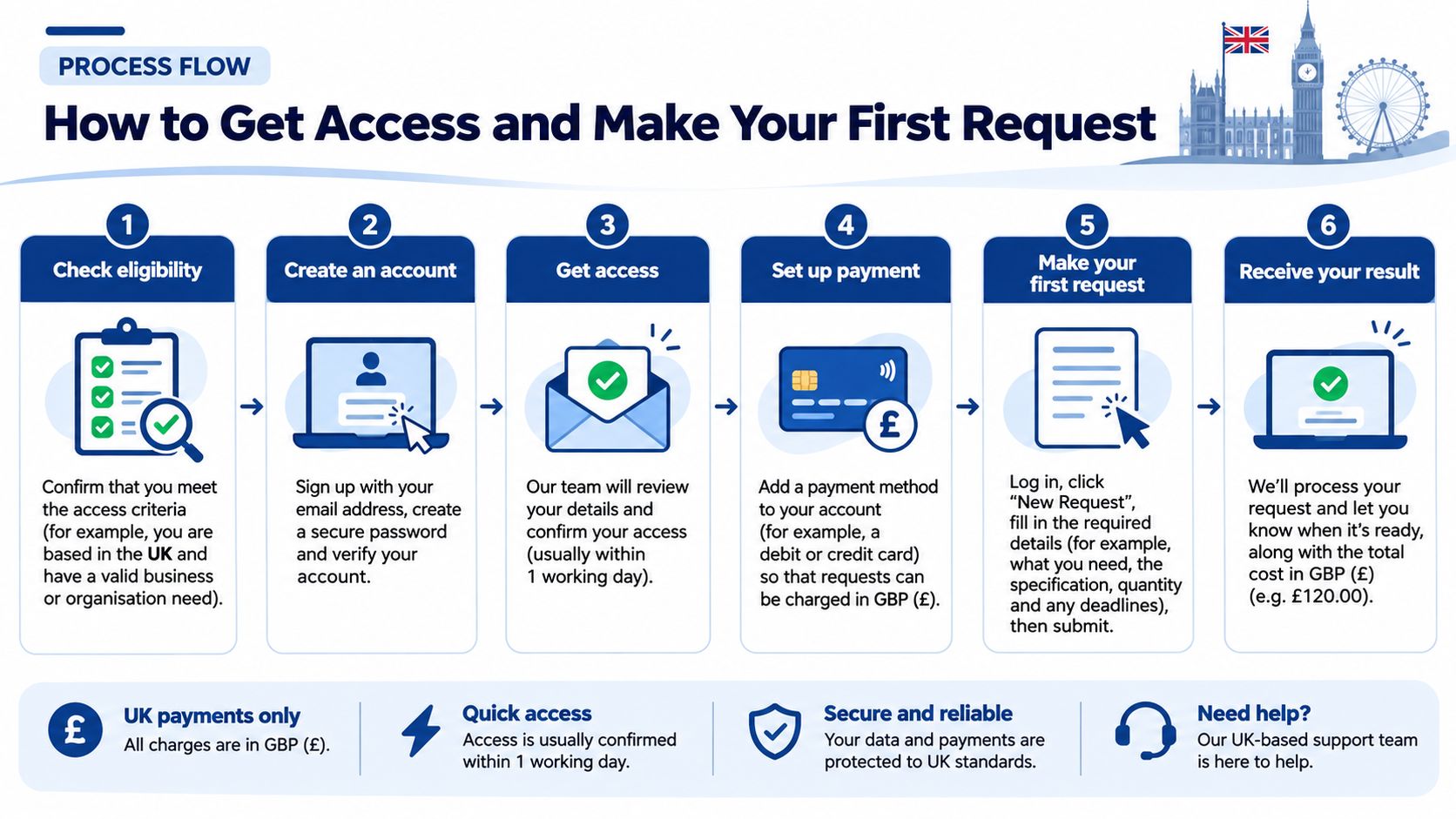
How to Get Access and Make Your First Request
- Confirm the current access requirements. Read the Find a Tender developer documentation before configuring credentials or registration. Don't assume that search, downloads and notice submission share the same access arrangements.
- Choose the retrieval route. Use REST search and rendering for on-demand lookups, or OCDS release packages for bulk ingestion. Select the route according to the records you need, rather than whichever example looks easiest to copy.
- Run a publication-date search and preserve the response. Save the returned JSON unchanged so you can inspect the actual field names and nesting. If the result is empty, check the date range and notice-stage filter before changing your parser.
- Locate the process and release identifiers. Confirm where the OCID and release identifier appear in the OCDS records, following through from search results where necessary. Those identifiers let you distinguish a procurement from an update to it.
Use the access flow as a planning aid, but let the current service documentation determine whether registration is necessary for your chosen operation.
Inspect the response before writing the adapter
Don't begin with a database model copied from another tender portal. Open the JSON and follow a record from its search representation to its detailed notice or release representation.
Check whether a property is absent, explicitly null, an empty string or an empty array. Those aren't interchangeable states. Your adapter should preserve the difference until you've decided what each means for the application.
Keep your internal names separate from source paths. For example, an internal submission_deadline column is your application's choice, not a promise that every response contains a source field with that name.
A short mapping sheet helps:
- Source location: Record the actual JSON path found in the response.
- Internal meaning: Explain what your application calls the value.
- Missing-value behaviour: State whether the interface shows unknown, not applicable or a review warning.
- Display rule: Define how dates, currency and buyer names appear to users.
Define a successful first request
A successful HTTP response isn't enough. You should be able to select a returned record, identify its procurement process, inspect its release identity, recognise its stage and open a readable source notice.
For an active competition with a published submission deadline, show that deadline in a form a bid manager can understand. For planning records, a missing submission deadline may be entirely appropriate. Don't manufacture one from an expected procurement date.
Test the hand-off as well. Give a colleague the result and ask which action they would take: investigate, prepare, bid or ignore. If they can't answer without opening several unrelated screens, your first request works technically but the interface still needs attention.
Keep this initial exercise narrow. Establish that you can retrieve, interpret and trace a notice before adding automation around it.
Notice Stages, OCIDs and Bulk Ingestion Without Duplicates
One procurement can generate several notices. The FTS summarised-search documentation links them through a unique OCID and maps UK1 to pipeline information, UK2 to preliminary market engagement, UK3 to planned procurement, and UK4 or UK13 to the active-tender grouping.
Classify the opportunity using its current lifecycle state. Don't turn every publication into a new sales lead.
UK notice types and the stage each one signals
| Notice type | Procurement stage | What a supplier can do |
|---|---|---|
| UK1 | Pipeline information | Spot larger planned procurements above £2 million early |
| UK2 | Preliminary market engagement | Make contact and contribute through the published engagement route |
| UK3 | Planned procurement | Prepare bid resources, evidence and partners in advance |
| UK4 or UK13 | Active tender | Check the notice's participation route and respond within the published deadline |
Contracting authorities must publish a UK1 pipeline notice for planned procurements with an estimated value above £2 million, as described in the Cabinet Office and HM Treasury SME action plan. That gives suppliers an earlier preparation signal than waiting for the competition to open.
Keep the original notice type as well as your broad stage classification. A search grouping is useful for navigation, but it doesn't replace reading the procedure, regime and participation conditions.
Use separate identities for processes and releases
The Find a Tender API specification documents JSON retrieval and an OCDS release-package endpoint using Open Contracting Data Standard 1.1.5 with UK extensions. It identifies the OCID as the procurement-process identifier and the release identifier as unique within that process.
That gives you distinct database responsibilities:
- Process identity: Use the OCID to group the procurement's chronology and maintain its current opportunity view.
- Release identity: Use the combination of OCID and release identifier to prevent duplicate ingestion.
- Source notice identity: Retain the published notice identifier for traceability and reconciliation.
- Alert identity: Track the business event already communicated, rather than equating an alert with every fetched release.
An idempotent upsert means retrying an ingestion operation doesn't create another copy of the same release. It doesn't mean throwing away history to keep a single mutable row.
Maintain release history separately from the current opportunity projection. The history answers what was published. The projection answers what the bid team should act on now.
Poll incrementally and commit deliberately
Use scheduled incremental polling by publication date. Follow the documented pagination mechanism and advance your checkpoint only after the fetched records have been stored successfully.
An overlapping retrieval window is a sensible defence against interrupted jobs and boundary errors. Because ingestion is idempotent, seeing a release again should be harmless.
Keep publication time separate from retrieval time. A record arriving later in your application isn't necessarily a newer statement from the authority. Likewise, a failed page request shouldn't cause your next run to skip the unprocessed interval.
Store the following with every release:
- Publication metadata: Preserve the source timestamp and relevant publisher information.
- Procurement stage: Retain the original classification and your normalised interpretation.
- Original payload: Keep the JSON needed to reproduce parsing decisions.
- Processing metadata: Record retrieval time, parser version and validation outcome.
Validate against the applicable schema when the specification changes. Route records that fail validation into a review queue rather than dropping them or allowing them to corrupt the current view.
Update the opportunity, not the lead count
Say a pipeline notice is followed by a tender notice under the same OCID. Keep both releases, update the existing opportunity and tell the assigned owner that bidding is now possible.
That's different from sending an unrelated new-opportunity alert. The owner should retain their qualification notes, partner discussions and evidence preparation.
Keep a single opportunity thread, then send meaningful updates within it. Deduplication shouldn't hide a deadline change or withdrawal.
Modified, withdrawn and superseded notices belong in that chronology. Apply updates according to their lifecycle meaning, not merely by replacing every field with whatever appeared in the last response.
For example, an omitted deadline shouldn't automatically erase a previously published deadline unless the applicable release semantics justify that change. An explicit withdrawal, however, should stop the system presenting the procurement as open.
Rank with constraints intact
Use the description for relevance matching, but retain procedure type, special regime and the procurement URL alongside it. A strong text match doesn't establish eligibility.
Combine buyer, geography, estimated value, classification codes and deadline in the opportunity view. Preserve lot-level distinctions where requirements differ, rather than flattening everything into a single description.
The practical outcome is fewer disconnected alerts and a better preparation history. The team can see when an opportunity first appeared, what changed and which source record supports the current recommendation.
Coverage Rules for Find a Tender Thresholds and Start Dates
24 February 2025 changes the coverage test. The Find a Tender search guidance says procurements starting on or after that date can include above- and below-threshold notices across the UK, excluding below-threshold notices in Scotland; older procurements generally show only above-threshold notices, usually over £139,688 including VAT.
That description isn't a universal threshold calculator. Don't hard-code the service's broad coverage explanation as the legal threshold for every contract category.
Check the procurement, not just the publication
A newly published update can concern an older procurement. If you use the update's publication date as the procurement start date, you can apply the wrong coverage rule.
Run these checks before trusting a result:
- Procurement start date: Determine which publication regime applies, and retain the evidence used.
- Buyer region: Identify the relevant jurisdiction rather than inferring it from a supplier address.
- Threshold status: Flag whether the procurement is below threshold, preserving unknown where the record doesn't establish it.
Keep buyer jurisdiction separate from delivery geography. A buyer's location and the place where a supplier must perform the contract answer different questions.
An address match is useful for discovery, but it shouldn't decide the legal coverage classification. Store those concepts in separate fields so a regional sales filter doesn't accidentally rewrite a procurement rule.
Make exclusions visible
A missing Scottish lower-value notice isn't necessarily a broken API integration. It may sit outside the service's stated coverage.
That distinction matters when a bid manager asks why an expected opportunity didn't appear. Engineers need to distinguish a retrieval failure, a coverage exclusion, an unknown classification and a relevance rejection.
Audit rule: When a date or regional check excludes a retrieved record, keep the record and the reason. Don't make it disappear without an explanation.
For notices you never retrieved, retain source-coverage notes and polling logs rather than claiming a notice-level rejection. You can't log a specific absent notice until you know it exists.
Our monitoring covers UK-wide public sector sources, including Welsh Government and Northern Ireland public sector sources. For any custom integration, maintain an equally explicit coverage register: which sources you query, which jurisdictions they serve and which gaps require a separate check.
Unknown should remain a visible state. It's more useful than false certainty when the team is deciding whether a missing alert needs investigation.
Cross-Checking Contracts Finder and Devolved Portals
The Find a Tender API doesn't remove the need to check lower-value and devolved publication routes. The government's SME selling guide describes Contracts Finder publication above £10,000 for central government and £25,000 for the wider non-devolved public sector; the more recent below-threshold limits are £12,000 including VAT for central government and £30,000 including VAT for sub-central authorities, NHS trusts and NHS foundation trusts.
Keep the applicable guidance and notice date together. Don't combine older values with newer VAT treatment and present the result as a consistent rule.
Give each portal a defined role
| Service | Cross-checking purpose | Integration caution |
|---|---|---|
| Find a Tender | Procurement lifecycle and relevant published notices | Preserve regime and stage |
| Contracts Finder | Lower-value and overlapping procurement records | Check buyer category and value basis |
| Sell2Wales | Welsh procurement coverage | Retain the Welsh source reference |
| eTendersNI | Northern Ireland procurement coverage | Preserve the local notice identity |
| Public Contracts Scotland | Scottish procurement coverage | Apply Scottish publication rules separately |
For Welsh buyers, check Sell2Wales. For Northern Ireland buyers, check eTendersNI. Treat Scottish coverage as a separate routing decision rather than assuming a UK-wide query catches every relevant publication.
Your filters should retain buyer category, VAT-inclusive value where supplied, and devolved-region exclusions. Avoid a universal minimum-value filter that masks differences between sources.
Merge cautiously across portals
Within a source, use its identifiers. Across portals, look for explicit shared references before attempting fuzzy matching.
Buyer name, title and dates can identify candidate matches, but they don't prove identity. A buyer can run similar procurements concurrently, and title wording can change between publications.
Use a comparison queue when the match is uncertain. Show the reviewer:
- Buyer evidence: Original name, normalised name and any available identifier.
- Procurement evidence: Title, description, dates and shared references.
- Scope evidence: Lots, geography, value and relevant classification codes.
- Source provenance: Portal name, notice identity and original publication record.
Normalise names for matching without overwriting the published text. Retain each portal's URL and notice identity even after a reviewer confirms the match.
The practical rule is one opportunity record with every source portal listed against it. A merged view should reduce duplicate work, not conceal conflicting deadlines or erase the evidence needed to resolve them.
Tender Periods and How Much Time You Get
A 10-day minimum tendering period can apply where a qualifying planned procurement notice has been published, according to the government's guidance on procurement time periods, which also sets out the electronic-submission and document-availability situations below.
That's little room to discover missing evidence after drafting has started. Treat the published timetable as operational data, not a detail buried beneath the contract description.
Minimum tendering periods by procurement situation
| Situation | Minimum period | What to do |
|---|---|---|
| Qualifying planned procurement notice published | 10 days | Treat as high priority and start drafting once qualified |
| Electronic tender with all documents supplied with the notice | 25 days | Plan a full response within a few weeks |
| Electronic tender with some documents arriving later | 30 days | Track the late documents and note any gaps |
| Tender not electronic and documents not supplied together | 35 days | Confirm the submission route and document timing early |
These are minimums for the stated situations, not a promise that every procurement fits neatly into the table. Read the actual notice, applicable procedure and submission instructions.
Calculate urgency without inventing time
Calculate both the interval between publication and submission and the time remaining when your system discovers the notice. The latter is what the team can still use.
Store the original timestamp and timezone information. Display local time clearly, and don't round a closing time into an ambiguous end-of-day date.
A useful triage sequence is:
- Confirm access: Can the team obtain the full document pack and use the submission portal?
- Check eligibility: Are mandatory requirements achievable before closing?
- Assign review: Reserve technical, commercial and approval time before drafting expands.
- Rank urgency: Sort qualified opportunities by remaining time, not just headline value.
Short deadlines shouldn't automatically outrank better-fit work. Urgency is a scheduling signal, not a reason to abandon qualification.
Make review the planned work
A prepared knowledge base reduces the need to search old folders for policies, credentials and case studies. AI response generation can then produce an evidence-led draft rather than asking writers to begin with an empty document.
Aim to make review the main writing-stage task, but don't assume drafting removes the rest of the bid workload. Pricing, mobilisation commitments, partner approval and contractual exceptions still need accountable owners.
For a short-window competition, I'd make the bid-or-no-bid decision on the first working day after discovery. If critical evidence is unavailable, record that reason and decline rather than spending the remaining window polishing an ineligible response.
Turning a Notice Into a Response Plan
Start with what the buyer will assess, not what your company usually says about itself. The government's assessment and award training explains that award criteria must relate to the contract, be clear, measurable and specific, and be proportionate to its nature, complexity and cost; authorities must also publish the assessment methodology, including available scores, minimum thresholds and disqualifying failures.
Turn those requirements into a response map before generating prose. A readable summary of the notice isn't a substitute for that map.
Map requirements to evidence
| Response-map field | What to record |
|---|---|
| Criterion | The buyer's wording and question reference |
| Scoring rule | Available score, threshold and assessment method |
| Evidence | Relevant case study, policy, credential or past response |
| Evidence gap | Missing proof or an unsupported commitment |
| Owner | Person responsible for answering or approving |
| Submission constraint | Format, word limit and required attachment |
Separate mandatory compliance from scored quality. A persuasive answer can still fail if the supplier hasn't met a minimum requirement.
Match evidence by substance, not just keywords. A case study mentioning security isn't automatically proof of the particular security control the buyer requests.
For each match, check recency, scope and permission to use it. A partner's credential should not become your own credential through careless drafting.
Draft in the buyer's structure
Generate answers from the mapped evidence in the requested order. Keep the buyer's question references intact so reviewers can trace every paragraph back to a requirement.
Use a bid-writing workflow that separates source material, generated text and approval status. If the draft contains an unsupported claim, mark the gap instead of filling it with plausible language.
For wider reading on bid evaluation topics, the State and Local Bid Reviews blog offers a separate reading route. Keep your response map anchored in the UK buyer's published documents rather than treating commentary from another procurement context as the applicable rules.
A polished answer without evidence is still an unsupported answer.
Assign reviewers by responsibility. Technical reviewers should validate delivery claims, commercial reviewers should approve commitments, and the submission owner should check completeness.
For a short-window bid, aim to establish the map and initial draft on the first working day. That's a planning recommendation, not a guarantee that every document pack can be processed immediately.
Finally, record which evidence supported each approved answer. Preserve review decisions alongside the reusable material so the next response starts from checked content, not merely familiar wording.
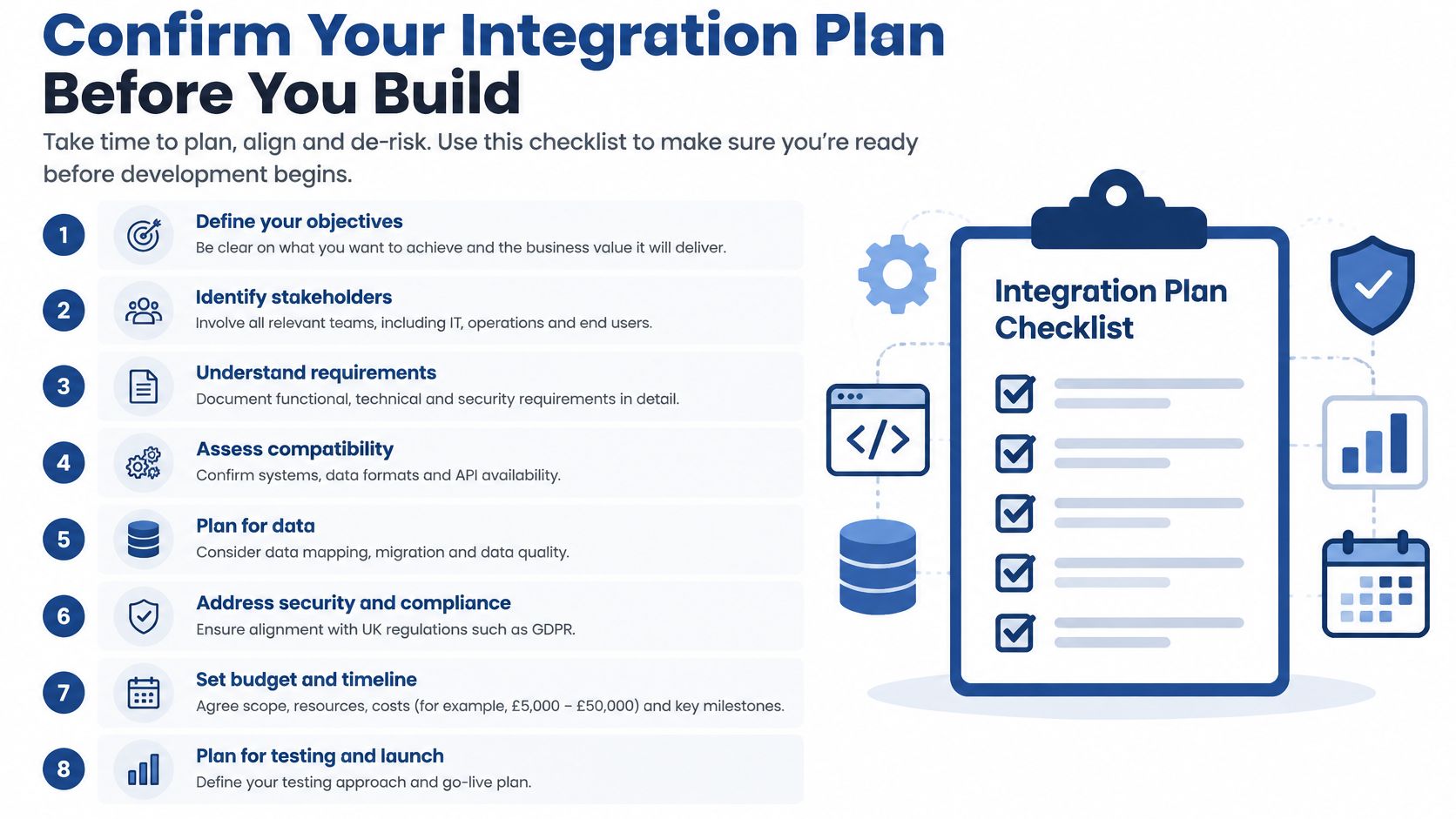
Confirm Your Integration Plan Before You Build
- Access confirmed: Document the requirements for each retrieval operation.
- Identity defined: Set the OCID and release identifier as the release deduplication key.
- Lifecycle handled: Test stage changes, amendments and withdrawals.
- Timetables recorded: Preserve deadlines, timezone information and available response windows.
- Coverage classified: Flag procurement start dates and devolved publication rules.
- Sources reconciled: Merge Contracts Finder and other portal records without losing provenance.
- Payloads retained: Keep original responses and reproducible parsing records.
- Ownership assigned: Name the people responsible for failures, maintenance and qualification decisions.
Use the checklist to review the proposed design before engineering work becomes expensive to change.
Choose who owns the maintenance
The mistakes to test for first are treating each notice as a new lead, ignoring procurement start dates and retaining only parsed fields. They cause different failures: duplicate work, misleading coverage and amendments nobody can explain.
Build directly on the API if you need a custom data model and control over ingestion. Budget engineering time for polling, retries, schema validation, reconciliation and ongoing maintenance, not just the first successful request.
If you need outside help defining those boundaries, Wisely platform integration consultancy is a relevant option to evaluate. Ask for explicit responsibilities, failure-handling behaviour and acceptance tests rather than a promise that systems will connect.
Buying a platform is the more practical route when your priority is daily alerts across UK portals and a managed path into response preparation. You still own qualification, evidence approval and submission.
Connect discovery to reviewed answers
Bidwell's tender discovery add-on costs £10 a month and watches every UK portal for tenders matching your sectors, frameworks and CPV codes. Its tender monitoring, knowledge base and AI response generation connect discovery with stored evidence and draft answers.
In the Draft stage, you drop in a blank tender or PQQ. Every question is extracted and matched to the knowledge base, and answers are drafted in your voice with citations for review.
Customers review, polish and submit the tender themselves. That boundary matters: software can prepare an answer, but your team must approve the claims and commitments it contains.
For bid managers, the decision is whether maintaining a procurement-data integration is necessary to the team's work or a distraction from it. Make that choice this week, assign an owner and agree what a successful discovery-to-response hand-off looks like.
Bidwell brings tender monitoring, a knowledge base and evidence-led AI response generation into the same bidding workflow. Visit Bidwell to assess whether managed discovery and reviewed drafting fit your team better than maintaining your own Find a Tender API integration.